Docs
Looks, sound and captions
The five looks, the sizes for each platform, the pace, the voices, the music and sound effects, the captions and the watermark.
Which looks are there?
Set the look with "theme" in video.json. The same scenes work in every look. That is because colors and fonts have role names, like accent or display, and each look fills them in its own way.
| Look | What it looks like | Scene change | Music |
|---|---|---|---|
paper |
marker drawings on warm paper | brush | warm |
clean |
flat cards with soft shadows | slide | upbeat |
chalk |
chalk on a green board | brush | calm |
blueprint |
white drawings on blueprint blue | wipe | tech |
midnight |
a dark background with glowing colors | zoom | tech |
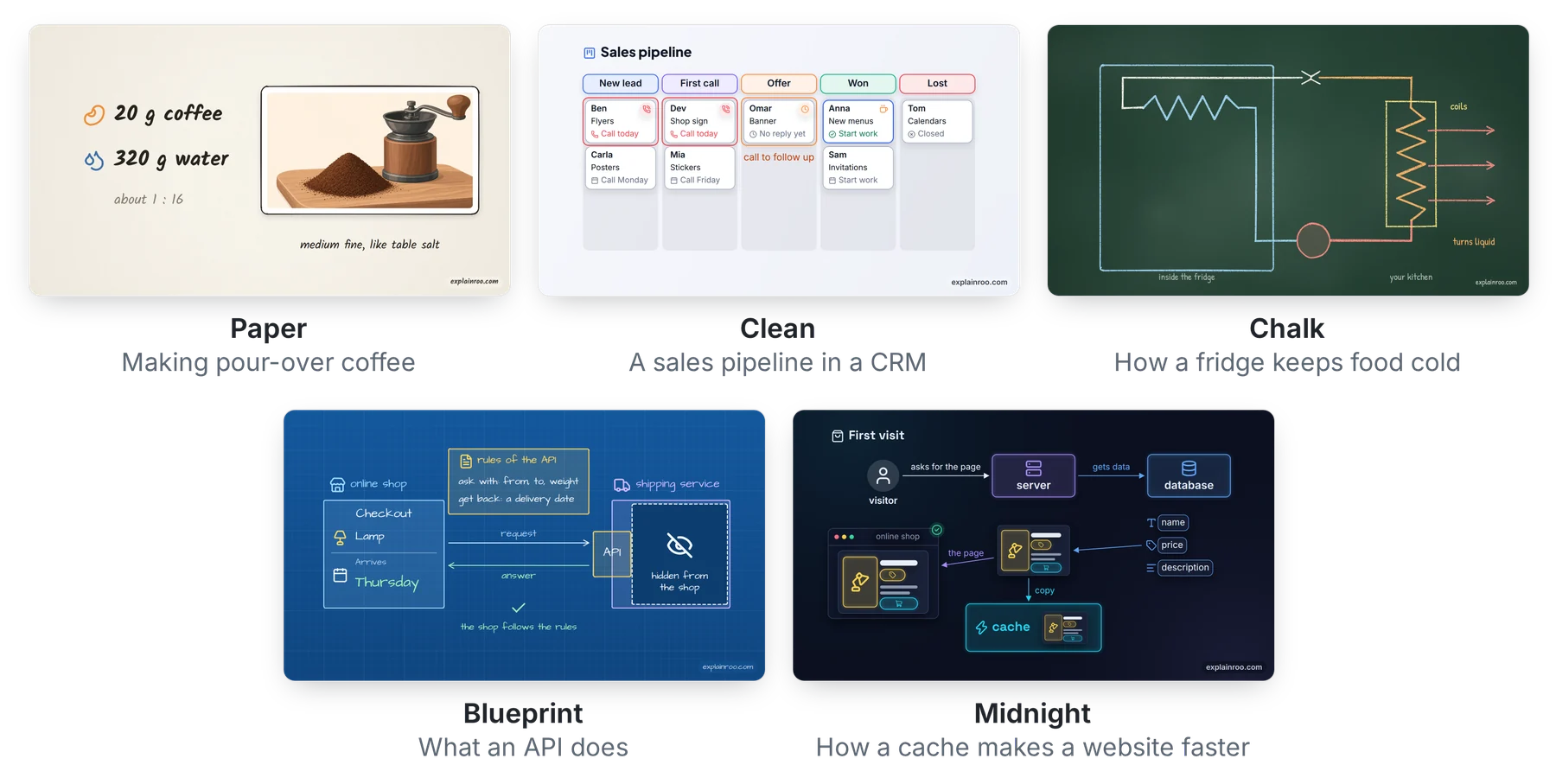
Paper is the default. Chalk suits teaching, clean suits products and business, blueprint suits engineering, and midnight suits developer tools.
Which sizes can a video have?
Set "size" in video.json to the place the video goes. explainroo formats lists the sizes:
| Size | Pixels | For |
|---|---|---|
youtube (or 16:9) |
1920 x 1080 | YouTube and other wide players |
shorts |
1080 x 1920 | YouTube Shorts |
tiktok |
1080 x 1920 | TikTok |
reels |
1080 x 1920 | Instagram and Facebook Reels |
vertical |
1080 x 1920 | one file for Shorts, TikTok and Reels |
instagram |
1080 x 1350 | Instagram and Facebook feed posts |
linkedin |
1080 x 1350 | the LinkedIn feed |
square (or 1:1) |
1080 x 1080 | square posts on X, LinkedIn and Facebook |
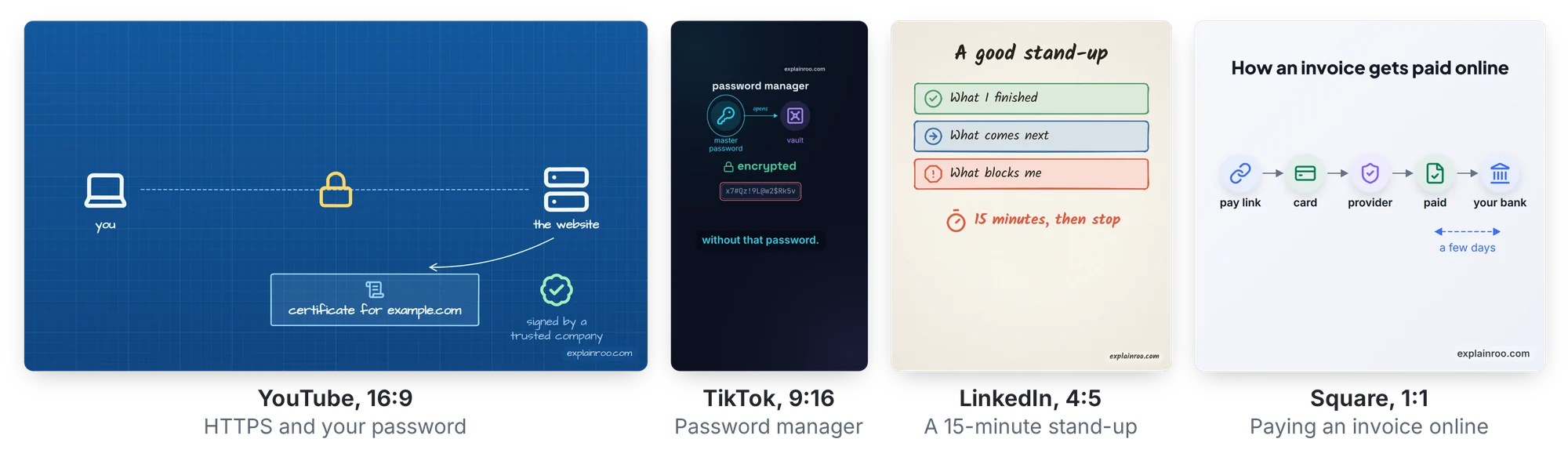
9:16, 4:5 and any size written as WIDTHxHEIGHT with even numbers also work. The default is 16:9.
Shorts, TikTok and Reels put their own buttons, the account name and the post text on top of the video. Each app covers a slightly different part of the screen. With shorts, tiktok, reels and vertical, explainroo keeps the pictures and the captions out of those spots. It moves the watermark to the top right, and check warns about any text the app could cover. A plain 9:16 video has no such margins.
The frame rate is 30 frames per second unless you set "fps" to 24, 25, 50 or 60.
Can a video be quicker?
Yes. "pace" in video.json speeds up the whole video. At 1.2 the voice speaks 20% faster. The pauses, the time between scenes, the scene changes and every animation get 20% shorter. Pictures tied to words follow the voice, and the video keeps its rhythm. The music plays a little faster too. 1 is the normal pace. Between 1.15 and 1.3 works well for social media and for viewers who know the topic. Above 1.4 gets hard to follow. You can also slow a video down, to as low as 0.7.
"speed" is different. It changes only how fast the voice speaks.
Which voices are there?
There are 28 English voices from Kokoro, with American and British accents. explainroo voices lists them. explainroo say "Hello there" --voice am_michael saves a sample, so you can hear one. The default voice is af_heart. Set another with "voice" in video.json. "speed" sets how fast it speaks. The default is 0.9, and it goes from 0.6 to 1.6.
How does the music work?
explainroo writes new music for each video, as long as the video. Each look has its own style. You can pick another one with "music", which takes warm, upbeat, calm, tech or playful. "music": { "style": "calm", "volume": 0.35 } makes it quieter. "music": false turns it off. The music always gets quieter while the voice speaks.
Where do the sound effects come from?
Things make a sound when they come in, and the look picks which one. In paper, a drawn shape makes a marker scribble. In clean, a card pops. Arrows whoosh and list items play rising notes. Numbers tick while they count up, typing clicks, and each scene change has a swipe.
"sfx": "minimal" in video.json keeps only the scene changes and the sounds you add with s.sfx(). "sfx": false turns them all off.
How do captions work?
Captions show the narration a few words at a time. Each word lights up as it is spoken. They are on by default for vertical, 4:5 and square videos. Set "captions": true or false to choose yourself.
Where they sit depends on the size. On Shorts, TikTok and Reels they sit right above the part the app covers. On 4:5, square and wide videos they sit at the bottom, above the watermark. On a plain 9:16 video they sit about a quarter of the way up. The content area, s.safe, always ends above them. check warns about text that sits where the captions go.
When captions are on, don’t also put the same sentence on screen as text. The viewer would read it twice.
Can I change the watermark?
Every video has a small “explainroo.com” in the bottom right corner. On Shorts, TikTok and Reels it sits in the top right, because the app covers the bottom. "watermark": false in video.json turns it off. "watermark": "yoursite.com" puts your own text there.
I’d ask you to keep it if you can. It helps other people find this free project, and it is a way to give something back.