Docs
Publishing a video
How to pick sizes, upload subtitles, add chapters and a cover, and export GIFs, transparent videos or a web player.
Which files do I publish?
Run render for the finished video, then verify to check its sound and picture. Upload the full-size MP4. Keep drafts for reviewing your work.
A normal render gives you these files in out/:
| File | What it is for |
|---|---|
video.mp4 |
the video to upload |
video.srt, video.vtt |
captions viewers can turn on and off |
video.cover.jpg |
a cover image without captions |
video.chapters.txt |
chapter times for a YouTube description, when your script names chapters |
If you use --out, the extra files share that name. A video without narration gets no subtitle files. A partial render with --from or --to skips chapters and the cover.
Which sizes can a video have?
Set "size" in video.json to the place the video goes. explainroo formats lists the sizes:
| Size | Pixels | For |
|---|---|---|
youtube (or 16:9) |
1920 x 1080 | YouTube and other wide players |
shorts |
1080 x 1920 | YouTube Shorts |
tiktok |
1080 x 1920 | TikTok |
reels |
1080 x 1920 | Instagram and Facebook Reels |
vertical |
1080 x 1920 | one file for Shorts, TikTok and Reels |
instagram |
1080 x 1350 | Instagram and Facebook feed posts |
linkedin |
1080 x 1350 | the LinkedIn feed |
square (or 1:1) |
1080 x 1080 | square posts on X, LinkedIn and Facebook |
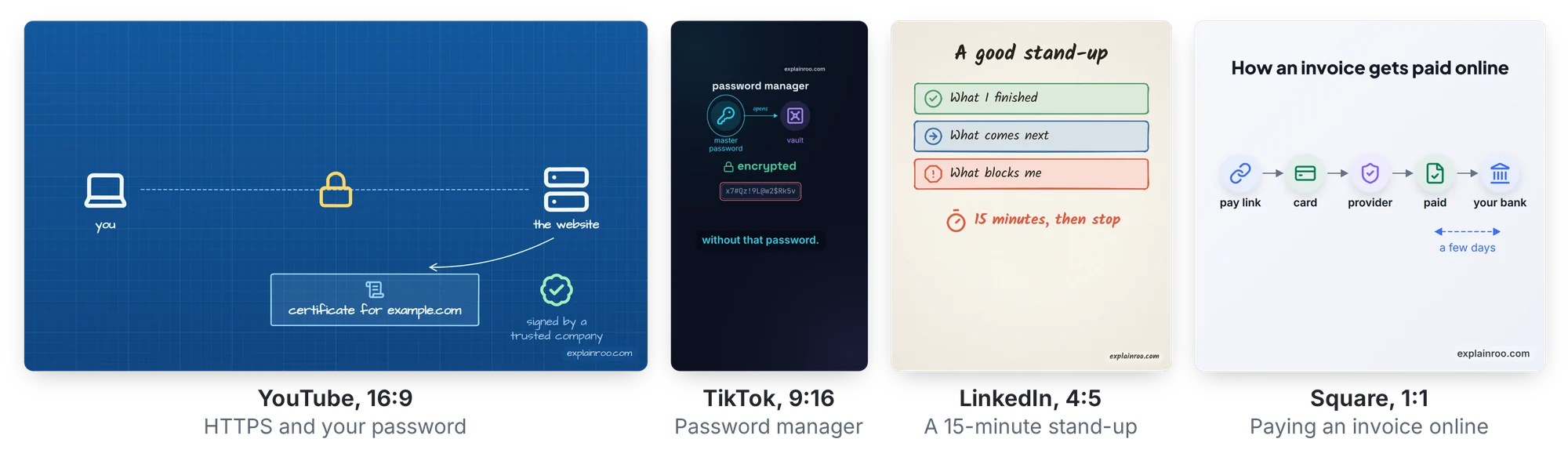
9:16, 4:5 and any size written as WIDTHxHEIGHT with even numbers also work. The default is 16:9.
Shorts, TikTok and Reels put their own buttons, the account name and the post text on top of the video. Each app covers a slightly different part of the screen. With shorts, tiktok, reels and vertical, explainroo keeps the pictures and the captions out of those spots. It moves the watermark to the top right, and check warns about any text the app could cover. A plain 9:16 video has no such margins.
The frame rate is 30 frames per second unless you set "fps" to 24, 25, 50 or 60.
How do I use one project in several sizes?
Use --size on preview, still, sheet, check and render. It changes the size for that run and leaves video.json alone. Narration and word times are shared. Captions set to "auto" follow the chosen size.
node bin/explainroo.js check videos/dns --size youtube
node bin/explainroo.js sheet videos/dns --size youtube
node bin/explainroo.js render videos/dns --size youtube
node bin/explainroo.js check videos/dns --size tiktok
node bin/explainroo.js sheet videos/dns --size tiktok
node bin/explainroo.js render videos/dns --size tiktok
Check each size and look at its sheet before rendering. Use s.safe, s.cx, s.cy, s.row, s.col and s.grid for positions. s.portrait tells you when to stack things in a tall frame. Text sized from the frame, such as s.W * 0.05, can follow its width. See drawing scenes and the scene reference.
Outputs get size names, such as out/video-tiktok.mp4 and matching subtitles, cover and chapters. Stills go in out/stills-tiktok/, and the sheet is out/sheet-tiktok.jpg. Ratios use a hyphen, such as video-9-16.mp4. --out still picks your own name.
Pass the file to verify: verify videos/dns --file videos/dns/out/video-tiktok.mp4.
How do I upload subtitles?
render writes SRT and VTT files even when captions is false. These files let viewers choose captions. Captions drawn into the video stay visible all the time.
On YouTube, upload the video, then add video.srt under its subtitles in YouTube Studio. Choose the video’s language and upload it with timing. On LinkedIn, add video.srt as the caption file while preparing your video post. Use the subtitle file from the same render as the video, so the times match.
VTT is useful for web players. The exported player includes subtitles and a CC button.
How do I add chapters?
Name a chapter in a scene heading, such as ## resolver {chapter="How the resolver finds it"}. It starts at that scene and lasts until the next chapter. See writing the script for the full rules.
render puts chapters in the MP4 and writes video.chapters.txt. Paste the file’s text into your YouTube description. YouTube needs at least three chapters, each at least ten seconds long. check gives hints when they do not meet those rules.
How do I choose the cover?
By default, cover is "auto". It picks the end of the first scene and saves a full-size JPEG without captions. Choose another moment in video.json:
"cover": "resolver@2.4"A number such as 12.5 is seconds into the whole video. "intro" or "intro@end" picks a scene’s end, and "intro@start" picks its start. Use the JPEG wherever the upload form lets you choose a cover.
Some feeds use the video’s first frame. Give an opening title enter: "none" so that frame has something to show. Changing cover changes the JPEG, so also check which frame the platform uses.
How do I make a GIF?
Use a GIF for a short example in a README or post:
node bin/explainroo.js render videos/dns --format gif --from 2 --to 8This writes out/video.gif. GIFs are silent, run at 15 frames per second and have a long side of at most 960 pixels. --out demo.gif picks another file name. Its ending must match the format. verify checks video files, so review the GIF yourself.
How do I put a diagram over filmed footage?
Render a transparent video for your editor:
node bin/explainroo.js render videos/dns --transparent --format mov
node bin/explainroo.js still videos/dns --transparent
node bin/explainroo.js verify videos/dns --file videos/dns/out/video.mov
MOV uses ProRes 4444 for editors. Use --format webm for VP9 on the web. MP4 and GIF do not support --transparent. Without the flag, MOV and WebM have an opaque background.
The look’s background texture is left out. Anything you paint stays, including s.bg(), s.ui.backdrop(), cards, captions and the watermark. Use a card or text’s bg option when it needs to read over footage. Slide, wipe and brush transitions become fades. The cover stays an opaque JPEG.
still --transparent saves PNG frames with alpha. verify --file checks the finished video and skips black-frame checks for transparent video.
How do I embed the web player?
Use export for a video on your website. It draws the scenes at the screen’s resolution, so text stays sharp as the player grows:
node bin/explainroo.js export videos/dnsIt writes out/player/ with its engine, fonts, assets, soundtrack, cover and subtitles. It makes the voice first if needed. --out <dir> chooses another folder.
Copy the whole folder to your site and serve it with a static web server. Keep its files together. It can live in a subfolder and needs no explainroo server. Opening index.html as a local file does not work.
For a wide video, embed it like this. Match the aspect ratio to your video’s width and height:
<div style="aspect-ratio: 1920 / 1080; width: 100%">
  <iframe
    src="/videos/dns/index.html"
    title="How DNS finds a website"
    style="width: 100%; height: 100%; border: 0"
    allow="autoplay; fullscreen"
    allowfullscreen
  ></iframe>
</div>
Add ?autoplay=1&muted=1 for muted autoplay, subject to the browser’s rules. ?t=12.5 starts at 12.5 seconds. Click the picture, Space or K to play or pause. Arrow keys seek five seconds. F opens fullscreen and M mutes. CC turns text captions on and off and remembers the choice. Captions drawn in the scenes stay visible.
Clips use the browser’s video decoder, so choose a format that browser can play. Clip timing can differ a little from the MP4. Math is included as typeset paths. Project modules must use relative local imports. The export leaves out project dotfiles, JSON and text files. Use the MP4 when uploading to video platforms.